 Ebeveyn
Your mum’s phone, as simple as a single button.
No more complicated menus or tiny text. Your elder presses one big button and says “call my son”; the call starts by itself.
- One-touch calling by voice command
- Voice messages, automatically transcribed
- “Mum saw your message” and low-battery alerts reach you
- Family video calls, invite guests by link
👨👩👧 However many of you there are, one person’s subscription covers the whole family.
Free for the first 14 days (except video calls).
📖 Step-by-step user guide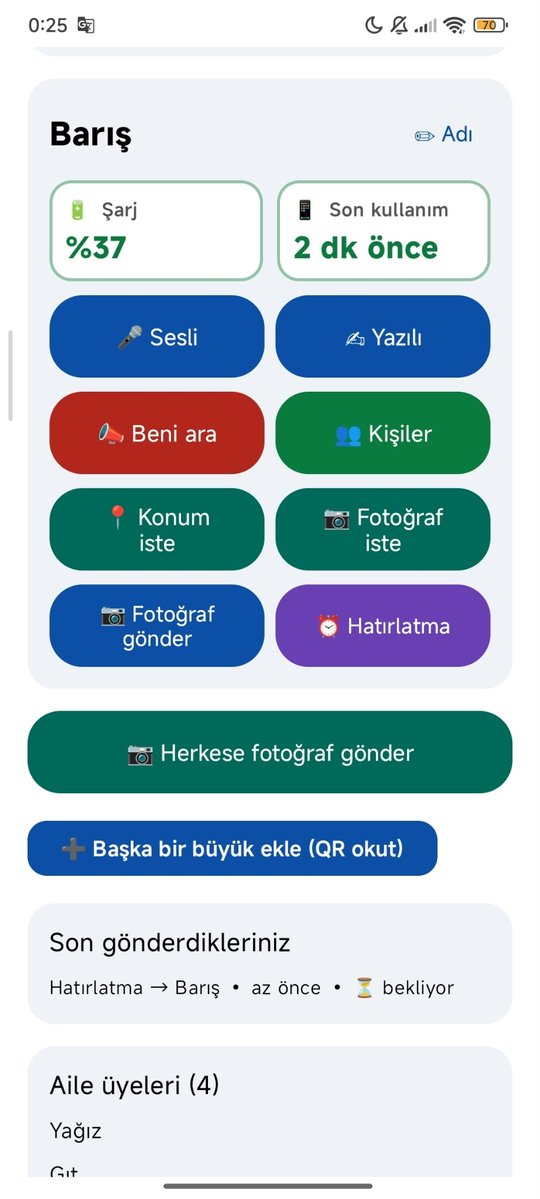
One big, simple answer to each problem
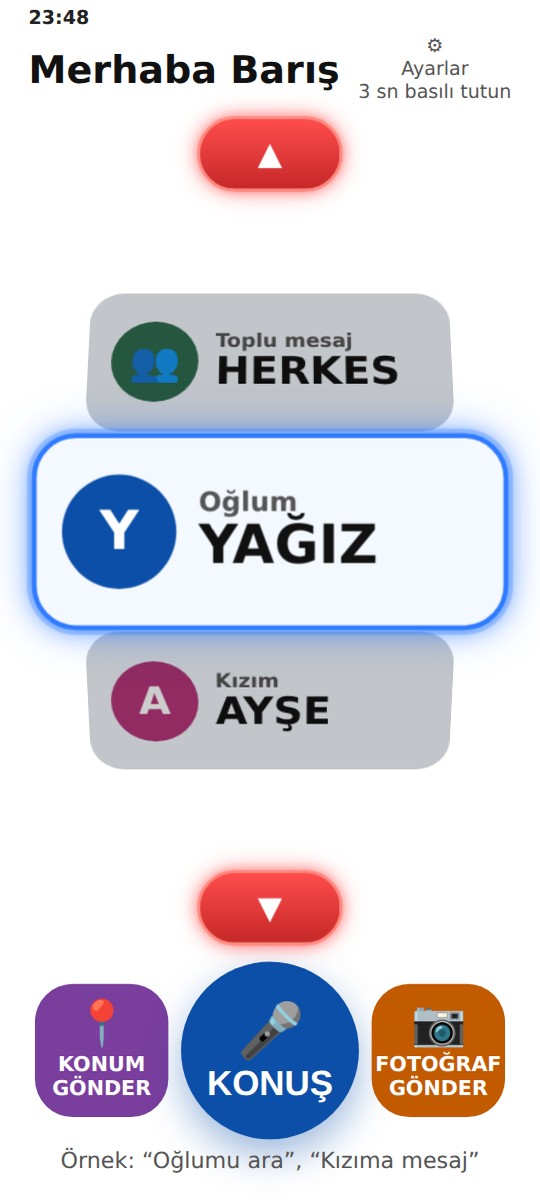
The screens are real screenshots from the app (shown in Turkish). Your elder’s screen stays simple; all settings are made from your phone.
📞Calling
Huge names, one button
Can’t read small text, can’t find someone to call.
Names are huge and high-contrast, and everything on screen is read aloud. Your elder picks a name and presses CALL, or presses TALK and says “call my son”.
- Calling by voice command
- A big 3-second CANCEL window before every call
- Everything on screen is read aloud
💬Messages
They speak, you also get it as text
Can’t type a message. You wonder whether they saw yours.
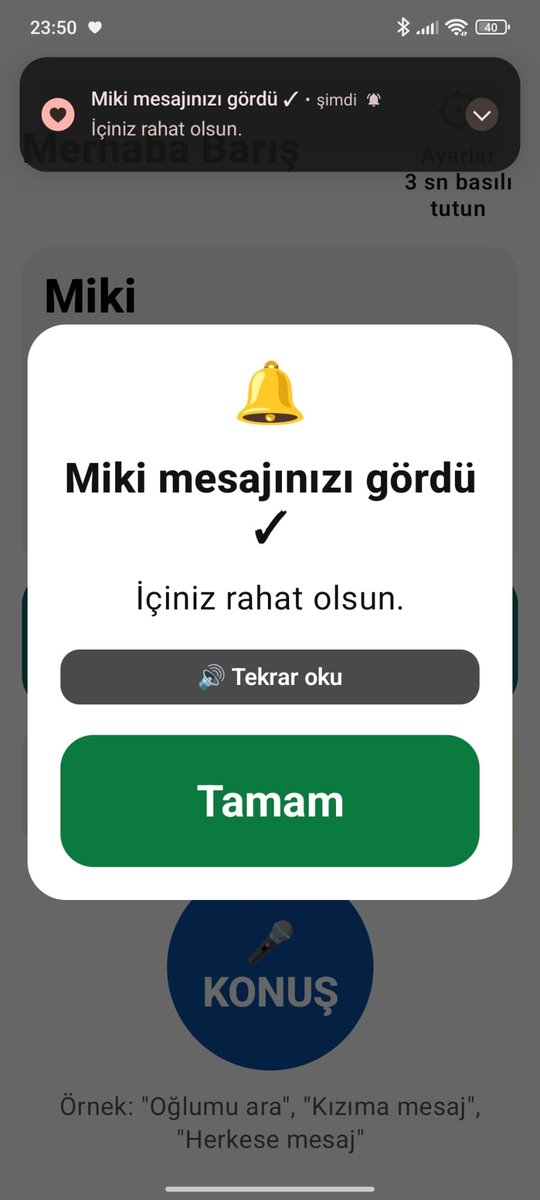
Your elder speaks; you receive it as audio and as text. Your message opens big on their screen and is read aloud. The moment they see it, you get a “seen” notice.
- Voice messages, automatically transcribed
- “Mum saw your message” notice
- Message everyone, or only the children
👨👩👧Family screen
Everything at hand, from afar
You wonder “how are you right now?” and “is the phone charged?”
On your own phone you see your elder’s battery and when they last used the phone. Ask for a photo with one tap, or see their face in a 10-second video.
- Alerts for low battery or long inactivity
- Photo requests and 10-second videos
- Siblings join the same family
📍Location
Location only with their approval
You want to know where they are, without secret tracking.
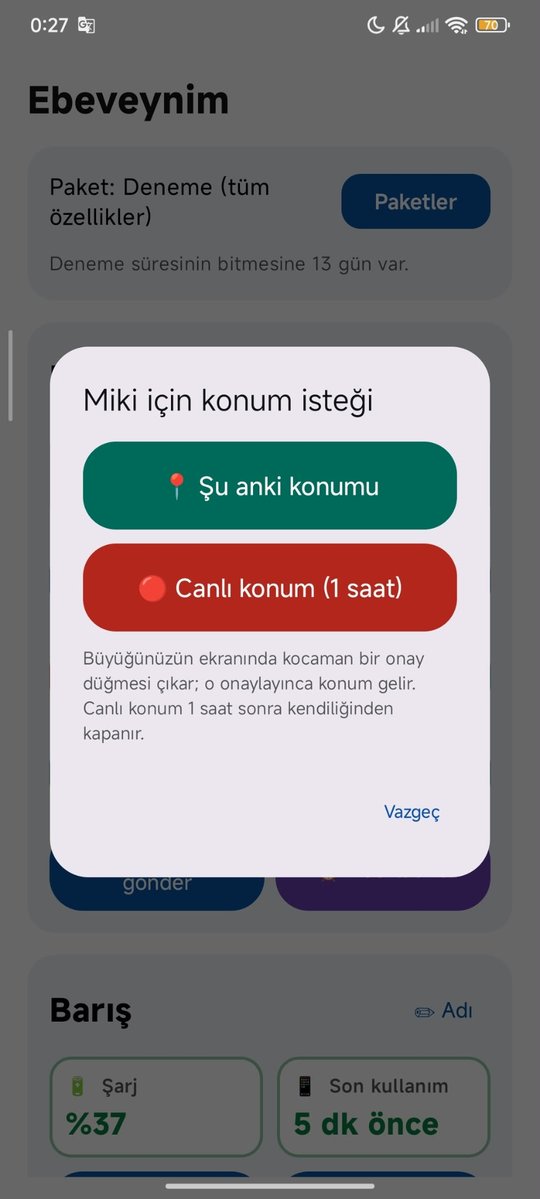
You tap “Ask location”; a huge approve button appears on your elder’s screen. Once approved, the location reaches you and opens on the map.
- One-off or live for 1 hour
- No secret background tracking
⏰Reminders
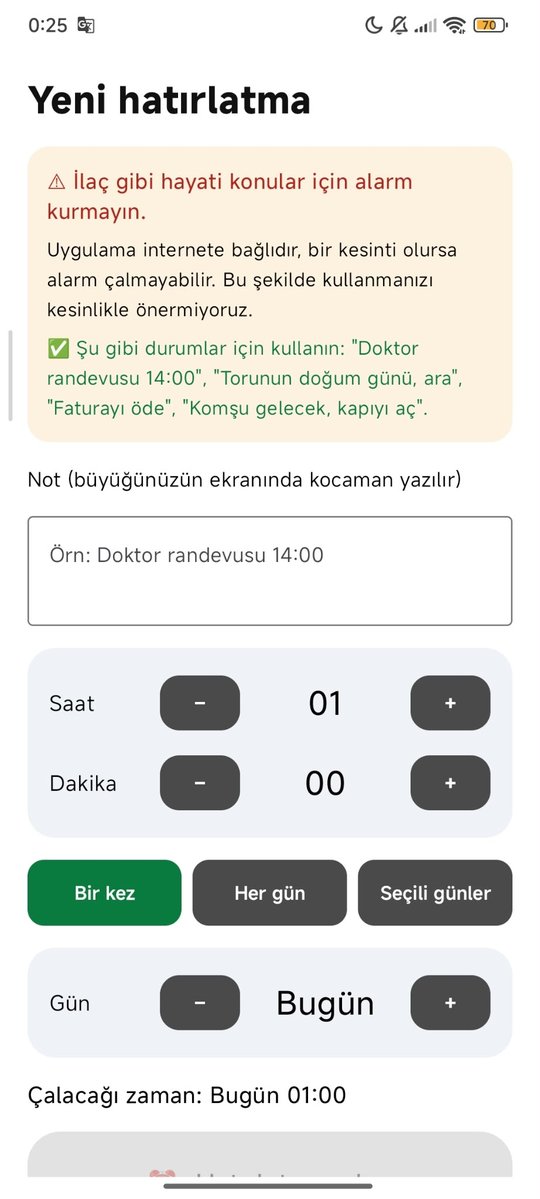
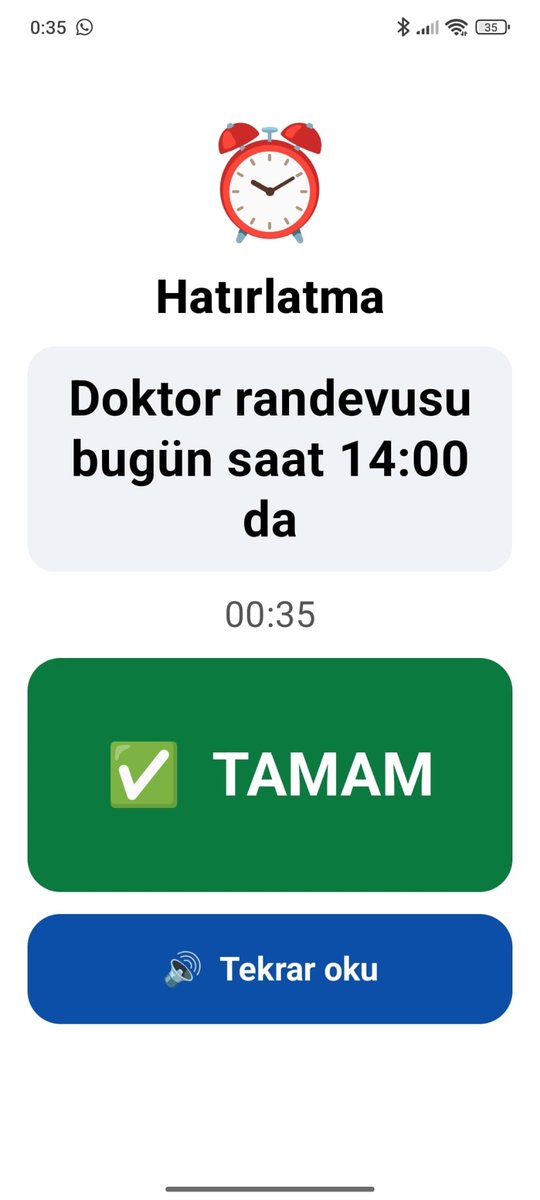
You set it, they see it big
They forget appointments and important days.
You set the reminder from your phone. When it’s time, an alarm rings on your elder’s phone, the note is shown huge and read aloud, and they press OK.
- Once, every day or chosen days
- Up to 10 reminders per elder
- Don’t use it for vital matters such as medication
📣Call me
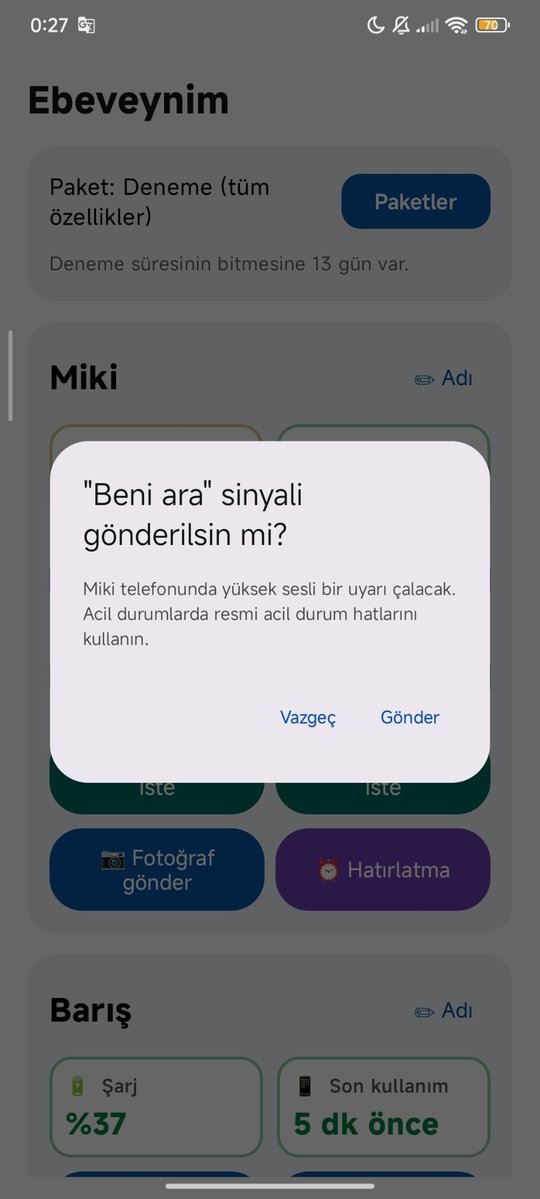
The “Call me” signal
You want to talk, but they might not hear the phone.
Send a “Call me” signal; a loud alert rings on your elder’s phone so they can easily call you back.
- In Family and Family Plus
- Not an emergency line
Face to face, with one tap
Your elder video-calls you, or answers your call with one big button. You can also invite a relative who doesn’t have the app, with just a link.
🎥For your elder
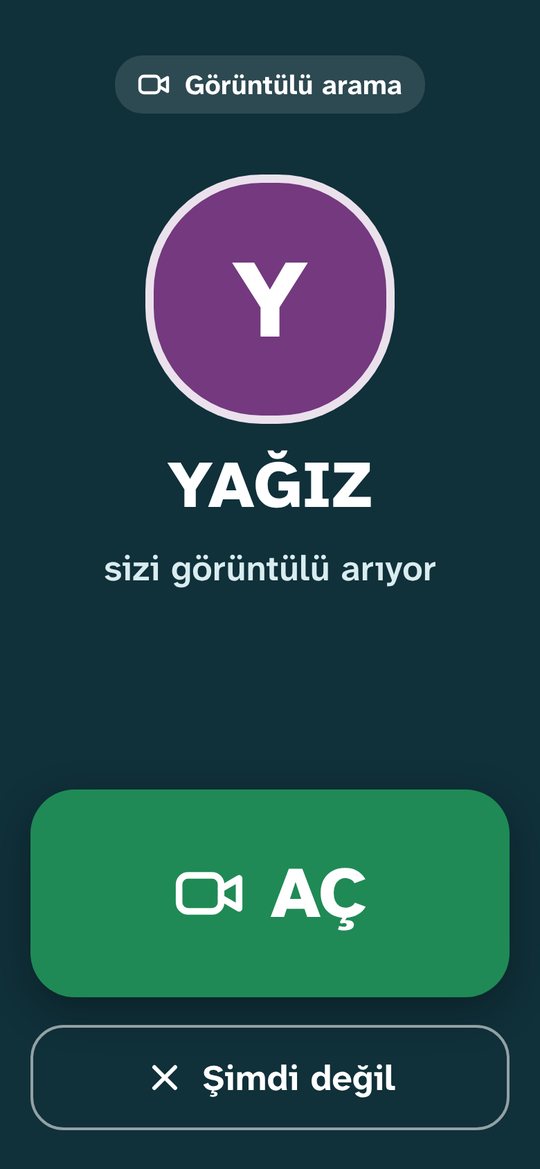
Rings like a phone call, opens with one big button
Video call apps have tiny buttons and busy screens.
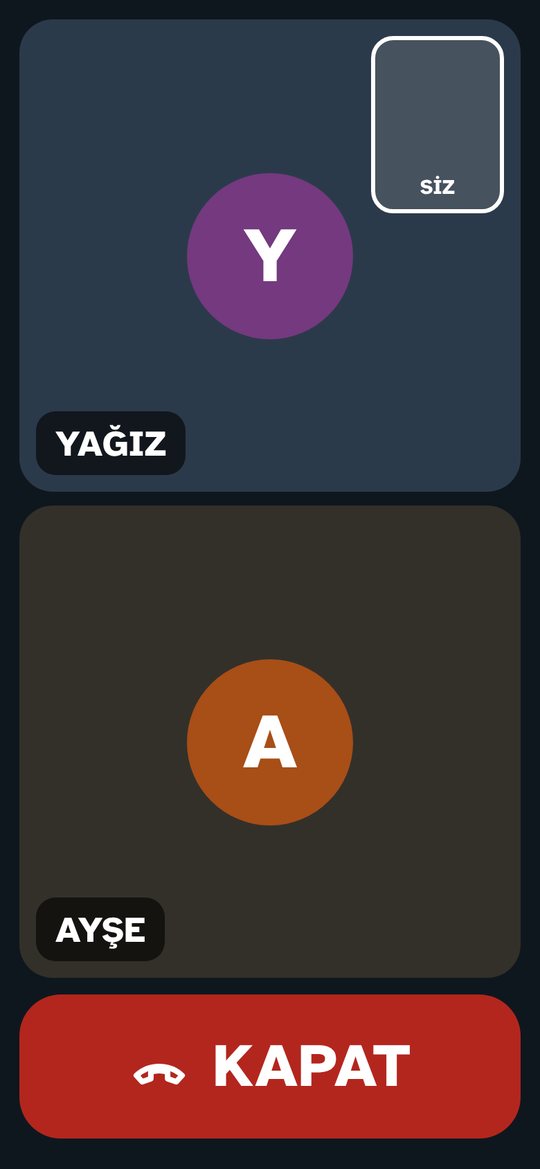
When you call, your elder’s phone rings like a normal phone call, even with the screen off. All they do is press the big ANSWER button. During the call they see only big faces and a single HANG UP button.
- A “Video call” button on each contact
- By voice: “video call Yağız”
- Up to 8 people in one call
🔗Invite by link
Bring in someone without the app
You’d like your aunt to join too, but she doesn’t have the app.
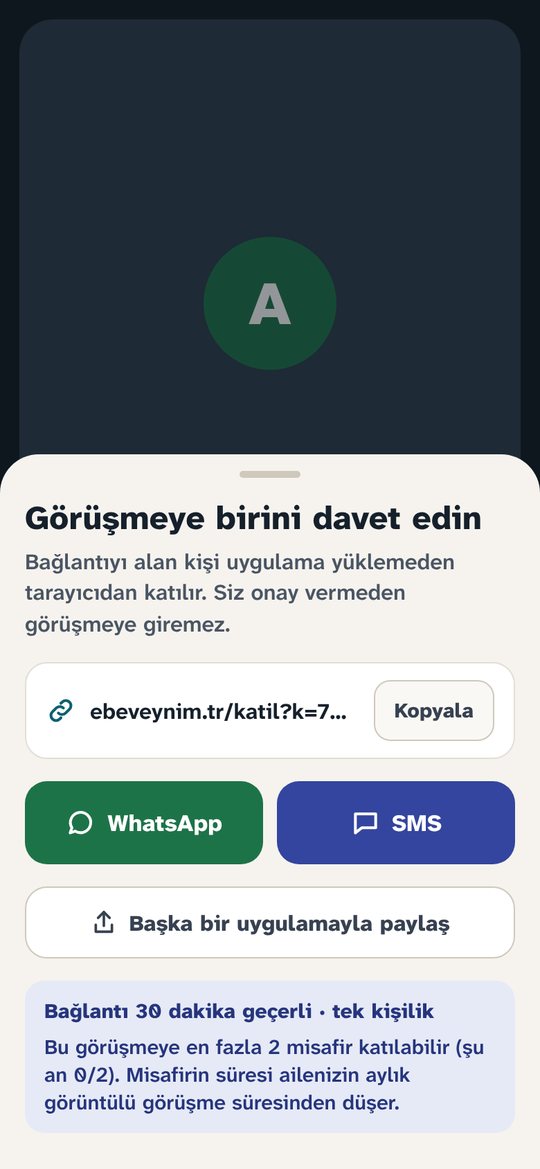
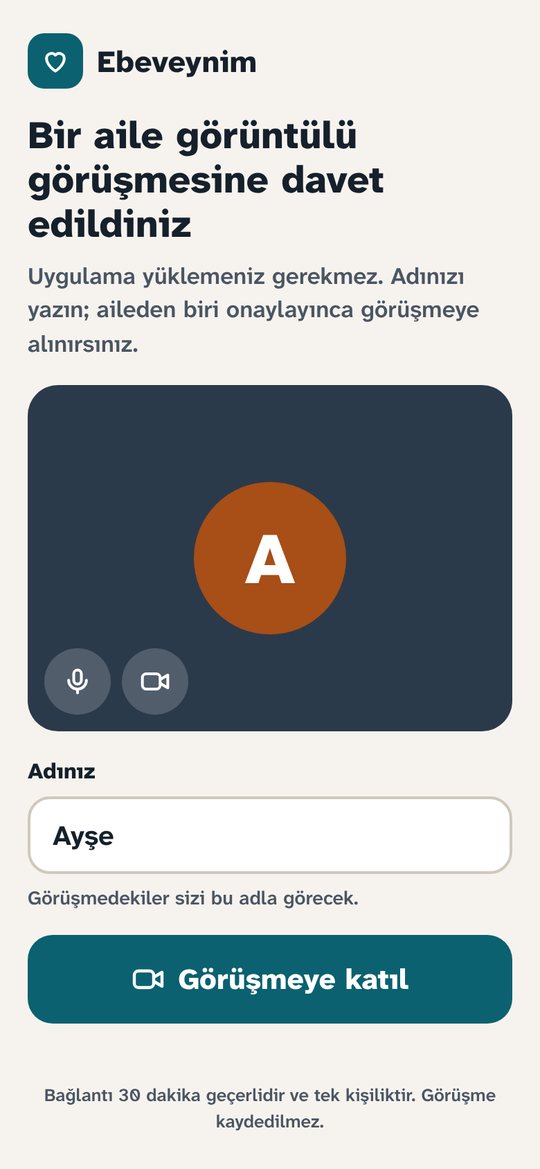
During the call, tap “Add person” and send the link via WhatsApp or SMS. The guest taps the link, types their name and joins from the browser. They can’t get in until you tap “Accept”.
- No app or account needed
- Up to 2 guests per call
- The link is valid for 30 minutes, for one person
Screens are shown in Turkish.
Ready in five minutes
You do the setup; your elder never has to touch a setting.
Install it on your elder’s phone
Take your elder’s phone, download Ebeveynim on that phone and choose “For my elder”. Enter their name; a QR code appears.
Scan it from your phone
Download Ebeveynim on your own phone too, choose “Mine” and scan the QR code on your elder’s phone. Your siblings can join with the same code.
Add contacts
Pick people from your contacts and give them nicknames like “my son” or “my daughter”.
⚠️ “For my elder” is chosen only on your elder’s phone. On your own phone always choose “Mine”.
🔒 Your messages stay in your family
Designed for your family, and nobody else.
Video calls are never recorded. The connection is encrypted, but unlike messages, video calls are not end-to-end encrypted and run through servers in Germany.
One subscription, the whole family
Free for the first 14 days, with every feature except video calls. Then you pick the plan that suits your family. Payment and cancellation are handled by Google Play or the App Store.
👨👩👧 However many of you there are, one subscription is enough!Only one family member buys it and everyone, including your elder, uses it. Nobody else needs their own subscription. If a second person buys too, you are charged twice.
Basic
$2.60 / month
- 1 elder, 1 family member
- Calling by voice command
- Voice and text messages
- Location and photos
- Reminder alarms
- 🎁 30 min of video calls free every month
- No video messages
Family
$6.50 / month
- 1 elder, up to 3 family members
- “Seen”, battery and usage alerts
- “Call me” signal
- 🎁 60 min of video calls free every month
- 📹 10-second video (1 a day from the elder)
- Everything in Basic
Family Plus
$13.00 / month
- Up to 4 elders (mum and dad can call each other)
- Up to 5 family members
- 🎁 120 min of video calls free every month
- Alert to the whole family on unseen messages
- 📹 3 videos a day from the elder
- Everything in Family
🎁 Every month your plan comes with free gift video call minutes: Basic 30, Family 60, Family Plus 120 minutes.
You can add +30 extra minutes for video calls: $1.69 + VAT, as many times as you like.
The price may vary by store (Google Play / App Store) and country; the exact price is shown on the purchase screen.
Extra minutes never expire and the whole family shares them. Your plan’s monthly minutes are used first, then the extra minutes.
✅ Extra minutes are ONLY for video calls. Messages, voice-command calling, location, photos, reminders and every other feature in your plan are included in your subscription; you never pay extra for them.Compare plans in detail
| Feature | Basic | Family | Family Plus |
|---|---|---|---|
| Family members / elders | 1 / 1 | 3 / 1 | 5 / 4 |
| Voice and text messages | Yes | Yes | Yes |
| Video from elder (10 s) | No | 1 a day, to one person | 3 a day |
| Video from family member (10 s) | No | 1 a day to the elder | 1 a day to each elder |
| 🎁 Free video call minutes (monthly, whole family) | 30 min | 60 min | 120 min |
| Extra video call minutes | +30 min, as often as you like (never expire, shared by the family) | ||
| Guests by link | Up to 2 guests per call, 8 people in total | ||
| Photo requests | Elder 10 a day; family member 3 a day per elder | ||
| Location | Current or 1-hour live, once the elder approves | ||
| “Seen” notices, battery and usage alerts, “Call me” | No | Yes | Yes |
| Reminder alarms | Up to 10 per elder | ||
| General limit | Up to 60 messages/requests an hour. While a location, photo request or “Call me” is unanswered, a new one can’t be sent for 30 minutes. | ||
During the trial everything in Family Plus is on, except video calls. If your elder says “Message everyone”, it goes to everyone including other elders; “Message my children” goes to family members only.
Frequently asked questions
For setup, changing phones, PINs, voice commands and everything else: 📖 Step-by-step user guide
Who buys the subscription? Does each family member pay?
No. The subscription belongs to the family. Only one member buys it; your elder and everyone else share the plan. Changes and cancellation are made from the buyer’s store account. If two people bought by mistake, the second buyer should cancel in the store.
Can I see my elder’s location?
Yes, with their approval. You tap “Ask location”, a huge approve button appears on your elder’s screen, and once approved the location reaches you and opens in Google Maps. It can be one-off or live for 1 hour. There is no secret tracking.
How do 10-second video messages work?
A video is at most 10 seconds and goes to one chosen person only. It is end-to-end encrypted and deleted from the server once opened. It is available in Family and Family Plus, not in Basic.
How do video calls work?
Your elder taps “Video call” on a contact, or presses TALK and says “video call Yağız”. When you call, their phone rings like a phone call and they answer with a big ANSWER button. Up to 8 people can be in one call. Monthly minutes depend on the plan: Basic 30, Family 60, Family Plus 120; if they run out you can add +30 extra minutes. Minutes are shared by the whole family and count only while at least two people are in the call. Video calls are off during the 14-day trial. Calls are not recorded; the connection is encrypted but, unlike messages, not end-to-end encrypted.
What happens if our video call minutes run out?
Don’t worry. In the app, tap “Add minutes” next to the “Video call” button or open Plans, and add +30 minutes, as many times as you like. Extra minutes never expire, are shared by the whole family and are used after your monthly minutes. Extra minutes are only for video calls; messages, voice-command calling, location, photos, reminders and every other feature in your plan are included in your subscription at no extra cost.
How do I invite someone who doesn’t have the app?
During the call, tap “Add person” and send the link via WhatsApp or SMS. The link is valid for 30 minutes and for one person. The guest taps it, types their name and asks to join from the browser; they can’t get in until you tap “Accept”. Up to 2 guests can join a call. Guest time is taken from your family’s monthly minutes. Only family members can invite guests.
My elder has an iPhone. Can we use it?
Yes. The iPhone version is coming and works together with Android. Because of Apple’s rules, on iPhone the message screen doesn’t open by itself on the lock screen; it arrives as a notification.
Is Ebeveynim an emergency app?
No. It is a calling and messaging app for family use. Messages and notifications can be delayed during internet or phone outages. In emergencies always use the official emergency numbers.
How do I cancel, and how do I delete my data?
To cancel, on Android go to Google Play → Payments & subscriptions, on iPhone to Settings → [your name] → Subscriptions. To delete your data use “Delete my account and data” in the app; details are on the account deletion page.

Simple for your elders, peace of mind for your family.